
TLDR: I saved my go-to recipes to Claude’s memory, connected it to my calendar, and now it plans my meals around my actual week instead of some idealized version of it. Here’s exactly how the workflow runs and why it’s the first meal planning system that’s stuck for me.
Meal Planning Is a Discipline I Do Not Have
I want to eat well. I train enough that what I eat actually matters. Marathon training, lifting, hockey, rugby — my body is burning through a lot and what I put in it affects how I perform and how I recover. I know this. I’ve known this for years.
And yet my meal planning has historically looked like staring into the fridge at 6pm, deciding nothing sounds good, and ordering food I didn’t need to order. Or I’d plan meals on Sunday with the energy of someone who has never met themselves on a Wednesday, buy all the ingredients, and then eat half of them before they went bad because the plan didn’t survive contact with a week that had three evening commitments and a long run that left me too tired to cook anything with more than four steps.
The problem wasn’t motivation. It was that my meal plans never accounted for what my week actually looked like.
The Tools
Claude: Does the planning. It knows my preferred meals because I’ve saved them to its memory, and it can see my Google Calendar, so it knows what kind of week I’m actually walking into before it suggests a single meal.
Google Calendar: The thing that makes this actually useful. Claude connects to it directly and reads my week before building the plan. Late meeting on Tuesday? It’s not suggesting a 45-minute cook that night. Long run Saturday morning? It knows I’ll want something easy that evening and probably more carbs the day before.
Claude’s memory: Where my preferred meals live. I spent about twenty minutes upfront telling Claude my go-to recipes, my dietary preferences, what I always have on hand, and what a “quick meal” means to me versus a “normal dinner.” It remembers all of it. I don’t re-explain any of it week to week.
The Workflow
I run this every Sunday morning. The whole thing takes about ten minutes, most of which is me reading the output and making tweaks.
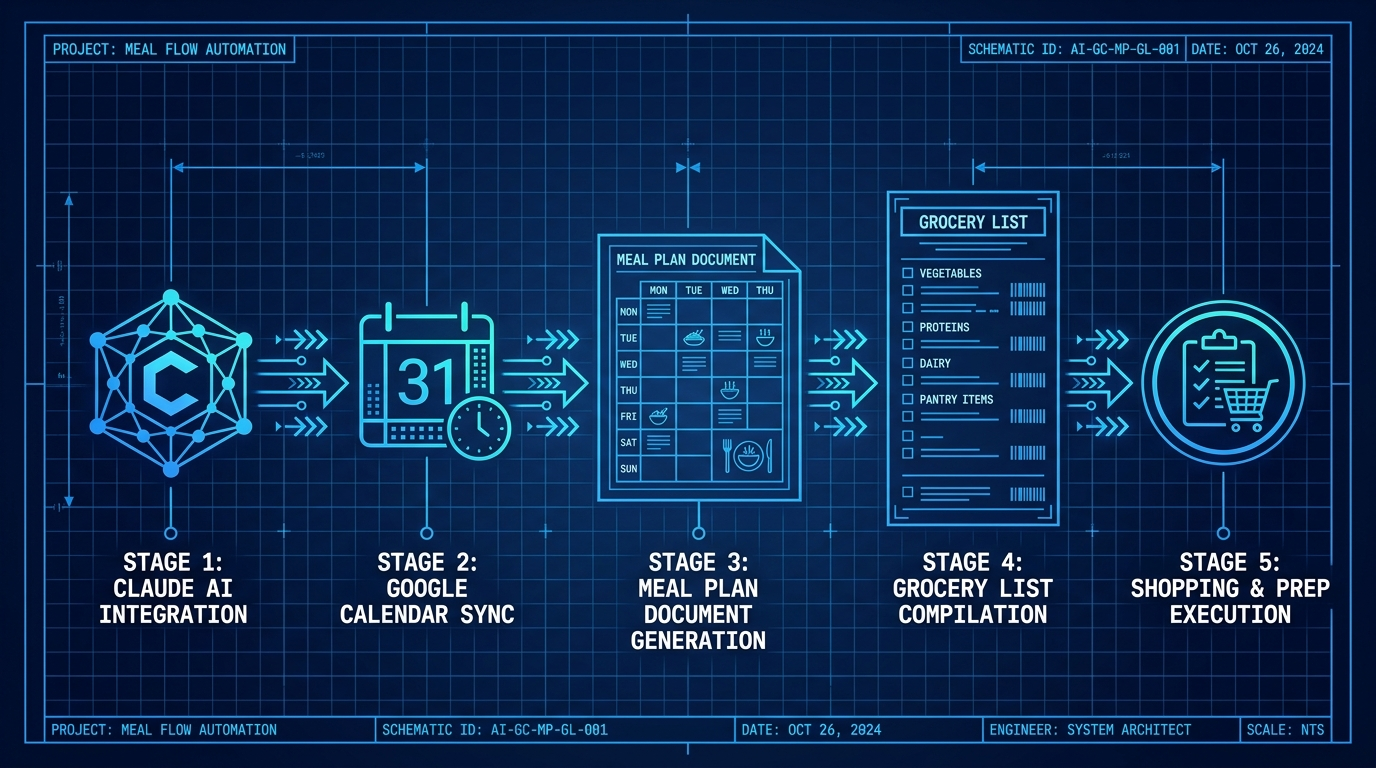
Step 1: Load your preferred meals into Claude’s memory. This is the upfront investment that makes everything else work. Open a conversation with Claude and tell it your go-to meals — the ones you actually cook, not the ones you aspire to cook. Include the rough prep time, what makes each one a “quick” versus “normal” meal for you, any dietary preferences or restrictions, and ingredients you keep stocked regularly. Tell it to remember all of this. From that point on, it has your roster.
Step 2: Ask Claude to check your calendar. With the Google Calendar integration active, I start my Sunday session by telling Claude to pull my upcoming week and flag anything that affects dinner. It looks for evening commitments, days with early mornings or late finishes, workout days where recovery nutrition matters, and any days where I’m clearly going to be short on time or energy.
Step 3: Ask for a meal plan built around that week. Not a generic plan. A plan that accounts for what it just saw. My prompt is something like: “Based on my week and my preferred meals, build me a dinner plan for Monday through Sunday. Flag which nights are quick meals and why. Don’t repeat anything from last week if you remember it.” That last part matters more than you’d think.
Step 4: Review and push back. Claude gives me a draft plan with a short note on each night explaining the choice. I read through it, swap out anything that doesn’t feel right, and ask it to adjust. This usually takes one round. It’s not precious about its suggestions.
Step 5: Ask for the grocery list. Once the plan is locked, I tell Claude to generate a consolidated grocery list organized by section (produce, protein, pantry, dairy). It cross-references what I’ve told it I keep stocked and only lists what I actually need to buy. I copy it into my phone and that’s my list for the week.
What a Real Week Looks Like
A couple weeks ago I had a Tuesday with a late work call, a Thursday rugby practice, a Saturday long run (18 miles), and Sunday was wide open. Here’s roughly what Claude came back with and why:
Monday was sheet pan chicken and vegetables. Easy, minimal cleanup, good protein to start the week. Tuesday was turkey meatballs with jarred marinara and pasta. Late call meant I needed something that could sit on the stove without babysitting. Wednesday was a normal cook night so it suggested the chicken stir fry that takes about 30 minutes. Thursday was the simplest thing in my roster — ground turkey rice bowls — because it knew I had rugby practice and wouldn’t be home until 10pm. Friday was designated “eat whatever’s left or order out” which I appreciated for its honesty. Saturday post-long-run was a big batch of chicken and sweet potato because recovery meal after 18 miles and I’d have time to actually cook it. Sunday was a proper dinner since I had the day to myself.
I didn’t have to think through any of that. It did it by looking at my week and pulling from meals it already knew I liked. The grocery list that came out of it had no overlap, no stuff I already had, and was organized well enough that I got through the store in one pass without backtracking.

Why This One Actually Stuck
Every other meal planning approach I’ve tried assumed I had the same amount of time and energy every night. I don’t. Nobody does. The calendar integration is what changes the math here. A plan that knows Tuesday is going to be brutal and Thursday ends at 10pm is a plan I can actually follow. A plan that doesn’t know that is aspirational fiction I’ll abandon by Wednesday.
The memory piece matters too. I’m not re-explaining what I eat every Sunday. Claude knows my roster. It knows what “quick” means in my kitchen. It knows I’m training for something most of the time and that my recovery nutrition isn’t an afterthought. That context compounds over time in a way that a spreadsheet or a meal planning app never could.
Where It Has Limits
It’s only as good as the meal roster you give it. If you’ve only told it five recipes, the plan gets repetitive fast. I’d recommend building out at least ten to fifteen go-to meals before you start leaning on this. Takes maybe thirty minutes upfront and makes the output meaningfully better.
It also won’t know about things that aren’t on your calendar. If you have an unwritten rule that Fridays are takeout nights, or you always cook a big batch on Sundays, tell it explicitly. It can only work with what it knows.
How to Start
Set aside twenty minutes this week to build your meal roster with Claude. List out every meal you actually cook on a regular basis with the prep time and whether it’s a quick or normal cook. Tell it your dietary preferences and what you keep stocked. Ask it to remember all of it. That’s the foundation. Once it has your roster, the weekly planning session is ten minutes and a grocery list you don’t have to think about.
Try This First
Open Claude right now and say: “I want you to remember my preferred meals so you can help me plan my week. Here are the dinners I cook regularly.” Then list them out. That’s step one. Do that today and you can run your first calendar-aware meal plan this Sunday.
Take what’s useful. Leave the rest.